 shinbo
Shinbo's 27 tools and the seven that ask
Shinbo adds 27 tools of its own to the harness, seven of which ask before they act, and can write new ones mid-conversation.
These guides describe the current development source. The published v0.7.1 release can differ; check release notes before following a workflow.
Twenty-seven of Shinbo's own. The shell is the harness's.
Shinbo ships no bash of its own. Files, search, shell, language-server queries, skills, MCP and subagents belong to the harness, shinbo-cli, and are gated over one permission channel. Shinbo's 27 tools are appended to that same registry, so the model sees one list and one set of rules.
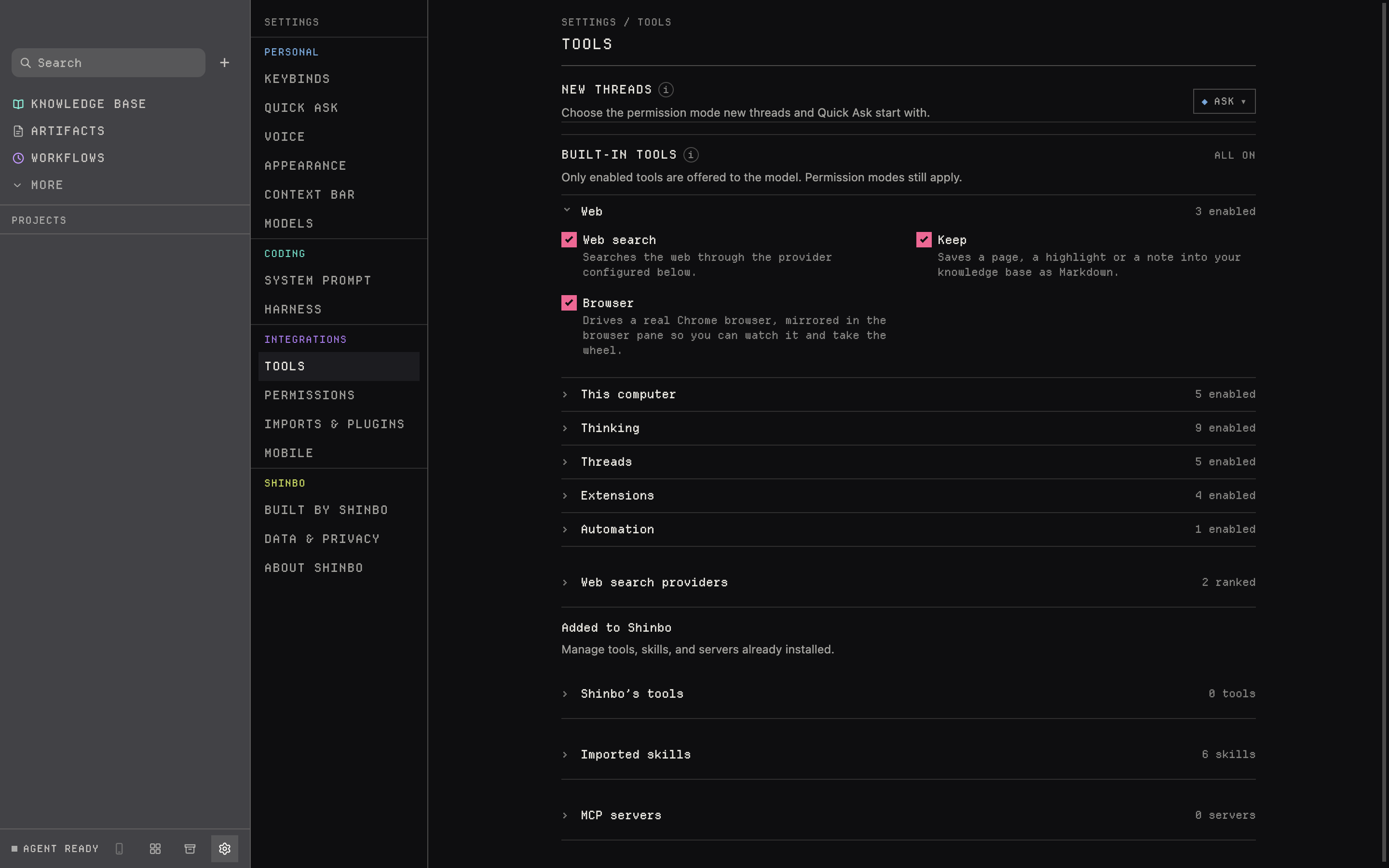
- Open Settings → Tools. Built-in tools are grouped by what they do, each group with an enabled count.
- Expand a group and switch off any tool you do not want offered. The hide applies in every permission mode, and a model that guesses the name is refused.
- Scroll down to Added to Shinbo: Shinbo's own written tools, imported skills and MCP servers, each with its own count.
- Start a thread and ask Shinbo to write a tool or skill for something you do often. It is live on the next turn.
The 27, and which ones ask
Seven tools carry an ask gate. In Ask and Accept edits mode they stop for you every time. In Auto the verifier model clears ordinary calls and hands you anything it will not clear. In Full access they run on their own, except computer, which always asks per app. Everything marked auto runs without a prompt in every mode. Modes are described under Control.
Shinbo writes its own
A handful of those tools extend the registry itself. Anything they install mid-turn is available on the next turn, with no restart.
- write_skill
- records a lesson as a skill the model can load later
- write_tool
- writes a script and registers it as a tool callable by name
- run_tool
- runs one of those scripts — ask-gated
- install_mcp
- adds an MCP server — ask-gated
- write_plugin
- packages skills in the Codex plugin format
- shortcut
- binds a prompt to a key combination; three slots
web_search can go through TinyFish, 4get, SearXNG, Brave Search, Tavily or Exa. The provider that answered shows its logo in the transcript. Search goes to that provider even when the thread's model is local.
Every tool call is a span in the thread's trace. Read it in the inspector, or let the agent read it with read_trace, which takes a numeric offset and returns up to eight traces per call. Recorded thread data exports as CSVs. Retention is covered under Self-improvement.
Outside the app the harness asks on the terminal instead of over Shinbo's permission channel. The v0.7.1 release still ships the binary under its old name, emma-cli, inside the app bundle.
- A hidden tool stays hidden in every mode, including Full access; hiding is not a per-mode setting.
- computer asks per app in every mode and runs under fixed rails; see Control.
- An installed MCP server or written tool is only as trustworthy as its source; install_mcp and run_tool ask for that reason.
Related: Control for the modes behind each gate, Harness for CLI adapters and imports, Notch & surfaces for artifacts that replace interface regions.